

Is monday.com Pro still enough for your team?
This page is a practical guide for growing teams who are wondering whether monday.com Pro is still enough - or whether Enterprise is now the better fit for their project management proceseses.
monday.com Pro can be the perfect option for managing projects, tasks and team collaboration, and maybe your boards, dashboards and workflows just need optimising.
But as your work becomes more complex, there may come a point where your setup starts to feel stretched and Enterprise gives you the visibility, control and scalability your team now needs.
This guide will help you understand the difference. If you'd rather talk through the pros and cons in relation to your specific business requirements feel free to book a call with us below!
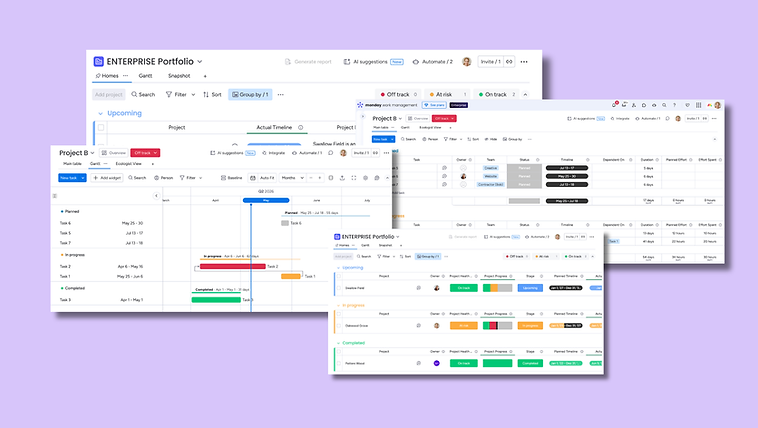
How to assess whether Pro is still enough
.png)
Your Challenge
Your monday.com work management setup worked well at first, but now the business has grown.
You may have more projects, more boards, more people, more reporting requests, more external collaborators or more pressure on delivery teams.
The result is often the same: leaders cannot get the visibility they need, teams are updating too many places, dashboards are not fully trusted, and work is being manually pulled into spreadsheets, slides or emails.
That is often when teams start asking whether monday.com Pro is still enough.


The Right Question
The key question is not simply:
“Should we upgrade to Enterprise work management?”
It is:
“Are we limited by the plan, or limited by the way monday.com has been set up?”
If your current setup is messy, upgrading alone will not fix it.
A poor setup on Pro can become a poor setup on Enterprise.
But if your business needs better reporting, portfolio visibility, resource planning, permissions and governance, Enterprise may be the right next step.


The Decision
The right decision should give your team more clarity, not more complexity.
For some businesses, that means staying on Pro and improving the setup.
For others, it means moving to Enterprise so monday.com can support larger-scale work management, portfolio reporting, controlled access and better visibility across multiple teams or projects.
Either way, the aim is a setup that gives you clear ownership, trusted reporting and less manual admin.
%20(5)_edited.png)
When monday.com Enterprise starts to make sense
Enterprise becomes more relevant when monday.com needs to support scale, complexity and control.
You may not need every Enterprise feature on day one. But if several of the situations below feel familiar, it is probably worth reviewing whether Pro is still the right fit. And remember, the 'Enterprise' option isn't necessarily for the big FTSE companies. It can still be the right option for SMEs.
1) You are managing more projects, programmes or client portfolios
You may be reaching this point if:
-
There are too many active boards to check manually
-
Project overviews are being updated manually
-
Senior leaders need one view of project health
-
Teams are starting to manage work in different ways
-
Project managers are creating their own reporting workarounds
-
Updates are being copied into spreadsheets, slides or emails
-
You need portfolio-level reporting rather than individual project updates
This usually indicates the shift from project tracking to portfolio management.
2) Reporting is becoming too manual
Enterprise may be worth reviewing if:
-
Leaders need a reliable view across multiple boards
-
Staff members are copying, consolidating and / or reformatting monday.com data every week or month
-
Dashboards are not giving enough visibility
-
Project data is inconsistent across teams
-
People do not fully trust the reports
-
Risks, blockers, workload or delivery status are hard to see
-
Reporting is still happening outside monday.com
Enterprise can support more advanced reporting, but the board structure still matters. If the data going in is inconsistent, the dashboard coming out will still be unreliable.
3) You need better resource and capacity planning
As teams grow, it becomes harder to understand who is working on what.
This is especially true when people are shared across multiple projects, departments or clients. Enterprise becomes more relevant if you need to answer questions like:
-
Who is over capacity?
-
Which projects are putting the most pressure on the team?
-
Do we have enough resource for upcoming work?
-
Where are the bottlenecks?
-
Which teams are carrying the most delivery load?
-
Can we take on more work without increasing risk?
If monday.com is now being used for delivery planning, not just task tracking, visibility over people and capacity becomes much more important.
4) Permissions and governance are getting harder to manage
Permissions often feel simple at the beginning.
Then more teams join. More boards are created. Clients or contractors need access. Sensitive information appears in some areas but not others. People need different levels of control.
Enterprise may be worth considering if:
-
You need more controlled access across teams
-
You regularly work with external clients or contractors
-
You need more granular permissions
-
You want to reduce accidental edits to important boards
-
You need clearer admin controls
-
You want to standardise how boards and templates are created
-
monday.com has become business-critical
Good governance is not about making monday.com harder to use. It is about keeping the system manageable as it grows.
5) Automations and integrations are becoming business-critical
Enterprise may be worth reviewing if:
-
Automations are running across multiple teams or departments
-
Integrations are connected to important business tools
-
You are approaching plan limits
-
Manual workarounds are appearing because limits feel restrictive
-
Teams rely on automations for handovers, alerts or updates
-
Your workflows are becoming more complex
The important point is not just volume. It is dependency.
If your team now depends on monday.com automations and integrations to keep work moving, it may be time to check whether your current plan gives you enough headroom.
What a good Enterprise setup should achieve
If you do move to Enterprise, the goal should not be “more features”.
The goal should be a better operating rhythm.
A good monday.com Enterprise setup should help you:
-
See project and portfolio health clearly
-
Understand workload and capacity
-
Standardise repeatable work
-
Give leaders better reporting
-
Keep permissions under control
-
Reduce manual chasing and updates
-
Make handovers clearer
-
Collaborate with external users safely
-
Scale your workflows without creating chaos
Enterprise is most valuable when it supports better management decisions, not just more complicated boards.
When monday.com Pro may still be enough
You do not need to upgrade just because your monday.com setup feels busy.
Pro may still be the right plan if:
-
You are managing individual projects or smaller project sets
-
Most work sits within one team or department
-
Your dashboards only need to cover a limited number of boards
-
You do not need advanced portfolio-level reporting
-
Permissions are fairly simple
-
External collaboration is limited
-
Your automations and integrations are not close to their limits
-
You do not need detailed resource or capacity planning
-
Your main issue is adoption, consistency or board structure
This is an important distinction.
Not every monday.com problem is a plan problem.
If your team does not trust the data, dashboards are unclear, boards are duplicated, or processes vary too much between teams, it may be better to optimise before upgrading.
Enterprise gives you more capability, but it will not automatically fix unclear workflows.
A clean setup matters on any plan.
In those cases, improving your setup may give you more value than upgrading your licence.
monday.com Pro vs Enterprise: practical comparison

monday.com Pro is usually best for:
-
Individual teams
-
Smaller project sets
-
Internal collaboration
-
Task and project tracking
-
Team-level dashboards
-
Straightforward permissions
-
Automations and integrations at a moderate level
-
Businesses that need structure, but not heavy governance
Pro can be a strong choice when your team mainly needs to plan, assign, track and report on work within a manageable setup.

monday.com Enterprise is usually best for:
-
Multi-team work management
-
Portfolio-level visibility
-
Complex project or programme environments
-
Resource and capacity planning
-
Larger numbers of boards, dashboards and users
-
More controlled permissions
-
External collaboration with clients or contractors
-
Stronger governance and admin controls
-
Higher automation and integration requirements
-
Businesses that need monday.com to scale across operations
Enterprise is usually the better fit when monday.com is becoming a central operating system for how the business manages work.
The key difference
Pro helps teams manage projects.
Enterprise helps businesses manage work at scale.
Need a second pair of eyes on your monday.com setup?
If you are unsure whether Pro is still enough, or whether Enterprise would give you better visibility and control, we can help you think it through.
The Workflow People are UK-based monday.com specialists. We help teams improve, optimise and implement monday.com so it fits the way their business actually works.
Sometimes that means helping a team get more from Pro.
Sometimes it means helping them move to Enterprise with the right structure in place.
Either way, the starting point is the same: understanding your workflow properly before changing the system.
FAQ
Is monday.com Enterprise only for large businesses?
No. monday.com Enterprise is not just for large companies. It can also be useful for growing SMEs, agencies, operations teams and service businesses that need stronger visibility, permissions, governance or portfolio management.
The decision is less about company size and more about complexity, scale and how important monday.com is to your day-to-day operations.
Is monday.com Enterprise worth it for SMEs?
It can be. Enterprise is not only for large corporates. It can be a good fit for SMEs if monday.com has become business-critical and the team needs better visibility, control and scalability.
Can you help us decide between monday.com Pro and Enterprise?
Yes. We can review your current monday.com setup, understand how your teams are using it, and help you decide whether monday.com Pro is still enough or whether Enterprise would be a better fit.
We will look at your workflows, reporting, dashboards, automations, integrations, permissions and future plans before recommending the most practical option.
Can you help us implement monday.com Enterprise?
Yes. We can help design, configure and implement monday.com Enterprise so it supports your workflows, reporting, permissions, governance and team adoption.
The aim is to create a scalable work management system that gives your business better visibility, less manual admin and clearer control across teams.
Can you optimise monday.com Pro if we do not need Enterprise?
Yes. If monday.com Pro is still the right plan, we can help improve your boards, dashboards, automations, integrations and workflows so your team gets more value from your current licence.
In many cases, a better setup can solve the problem without immediately moving to Enterprise.
How much do the licenses cost?
The best way to find out the latest pricing is to contact us at hello@theworkflowpeople.co.uk or to check out the monday.com pricing pages.
How do the AI credits work?
The Enterprise plan automatically includes AI credits to use in your workflows. The Workflow People ca help get these set up correctly to optimise the set up.
How much do you charge for optimisation or set up packages?
We work on a fixed fee basis so there are no hidden costs or extras you will need to worry about. Our implementation packages start from £3,500 + VAT.
If you can't see the answer to your question, please email us at hello@theworkflowpeople.co.uk and we'd be happy to answer.
